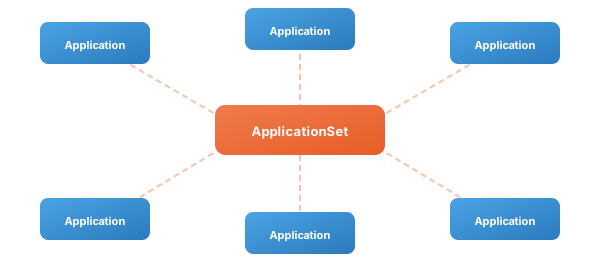
In my getting started guide for Argo CD, I mentioned the App of Apps pattern as a way to manage growing numbers of applications. That pattern works well when you have a handful of services, but it starts to show its limits when you are deploying the same application across dozens of clusters or generating applications dynamically from repository structures. This is where ApplicationSets come in.
The ApplicationSet controller is built into Argo CD and adds a custom resource that automates the generation of Argo CD Applications. Instead of writing individual Application manifests for every combination of cluster, environment, and service, you define a single ApplicationSet with a template and one or more generators that produce the parameters to fill it. The controller takes care of creating, updating, and optionally deleting the resulting Applications.
Why ApplicationSets Matter
Consider a platform team managing thirty clusters across three regions. Each cluster runs a common set of infrastructure services: an ingress controller, a monitoring stack, a certificate manager, and a log collector. Without ApplicationSets, that is 120 individual Application manifests to maintain. When you need to change the source repository or update a sync policy, you are editing dozens of files.
ApplicationSets reduce this to a single resource per service. Define the template once, point a generator at your cluster list, and the controller handles the rest. When a new cluster is added to Argo CD, the ApplicationSet automatically creates the corresponding Applications without any manual intervention.
The Structure of an ApplicationSet
An ApplicationSet has two main parts: generators and a template. Generators produce sets of key-value parameters. The template is an Argo CD Application spec with placeholders that get filled in by those parameters. For each set of parameters a generator produces, the controller renders the template and creates an Application.
Here is a minimal example using the List generator:
apiVersion: argoproj.io/v1alpha1
kind: ApplicationSet
metadata:
  name: monitoring
  namespace: argocd
spec:
  goTemplate: true
  goTemplateOptions: ["missingkey=error"]
  generators:
    - list:
        elements:
          - cluster: us-east-1
            url: https://10.0.1.100:6443
          - cluster: eu-west-1
            url: https://10.0.2.100:6443
          - cluster: ap-south-1
            url: https://10.0.3.100:6443
  template:
    metadata:
      name: 'monitoring-{{.cluster}}'
    spec:
      project: infrastructure
      source:
        repoURL: https://github.com/example/platform-config.git
        targetRevision: HEAD
        path: 'monitoring/overlays/{{.cluster}}'
      destination:
        server: '{{.url}}'
        namespace: monitoring
      syncPolicy:
        automated: {}
        syncOptions:
          - CreateNamespace=true
This creates three Applications: monitoring-us-east-1, monitoring-eu-west-1, and monitoring-ap-south-1. Each points to a cluster-specific Kustomize overlay and deploys to the corresponding cluster. Adding a fourth region is a single list entry.
Generators in Depth
The real power of ApplicationSets comes from the variety of generators available. Each one sources parameters from a different place, and you can combine them for more complex scenarios.
List Generator
The simplest generator. You define an explicit list of parameter sets. This is useful when you have a small, stable set of targets and want full control over the values. The downside is that it requires manual updates when targets change.
Cluster Generator
The Cluster generator automatically discovers clusters registered in Argo CD and generates parameters from their metadata. Every cluster that Argo CD knows about becomes a set of parameters including the cluster name, server URL, and any labels you have applied.
generators:
  - clusters:
      selector:
        matchLabels:
          environment: production
This generates parameters for every cluster labeled environment: production. When your platform team registers a new production cluster, the ApplicationSet picks it up automatically. No manifest changes required.
You can also use matchExpressions for more flexible selection. For example, to target all non-development clusters:
generators:
  - clusters:
      selector:
        matchExpressions:
          - key: environment
            operator: NotIn
            values:
              - development
Git Directory Generator
The Git Directory generator scans a Git repository for directories matching a pattern and creates parameters from the directory structure. This is ideal for monorepos where each directory represents an application or tenant.
generators:
  - git:
      repoURL: https://github.com/example/apps.git
      revision: HEAD
      directories:
        - path: 'services/*'
        - path: 'services/deprecated-*'
          exclude: true
For a repository with directories services/api, services/web, and services/worker, this produces three parameter sets. The generated path parameters include path.path (the full path), path.basename (just the directory name), and path.basenameNormalized (the name with special characters replaced by hyphens for use in Kubernetes resource names).
Exclusion rules take priority over includes, so you can broadly match a directory tree and carve out exceptions.
Git File Generator
While the Directory generator infers parameters from folder structure, the File generator reads JSON or YAML files from a repository and uses their contents as parameters. This gives you much richer configuration.
Imagine a repository with a clusters/ directory where each file describes a deployment target:
{
  "cluster": {
    "name": "us-east-prod",
    "address": "https://10.0.1.100:6443",
    "region": "us-east-1",
    "tier": "production"
  },
  "values": {
    "replicas": 3,
    "resources": "high"
  }
}
The File generator flattens these into template parameters, so {{.cluster.name}}, {{.cluster.address}}, and {{.values.replicas}} all become available in your template. This is particularly powerful because it lets application teams define their own deployment parameters in a self-service model. They commit a config file, and the ApplicationSet takes care of the rest.
Matrix Generator
The Matrix generator combines the output of two other generators by computing their Cartesian product. If generator A produces three parameter sets and generator B produces four, the Matrix generator produces twelve, one for every combination.
A common use case is deploying multiple applications to multiple clusters:
generators:
  - matrix:
      generators:
        - git:
            repoURL: https://github.com/example/apps.git
            revision: HEAD
            directories:
              - path: 'services/*'
        - clusters:
            selector:
              matchLabels:
                environment: staging
If you have three services and two staging clusters, this creates six Applications. The parameters from both generators are merged into a single set for each combination, so you can reference both {{.path.basename}} (from the Git generator) and {{.name}} (from the Cluster generator) in your template.
Merge Generator
Where the Matrix generator produces combinations, the Merge generator joins parameter sets from different generators based on a shared key. Think of it as a SQL join for generator outputs.
This is useful when you have base parameters from one source and overrides from another. For example, a Cluster generator provides the default configuration for all clusters, but a List generator supplies specific overrides for certain clusters:
generators:
  - merge:
      mergeKeys:
        - server
      generators:
        - clusters:
            values:
              replicas: "2"
              memory: "512Mi"
        - list:
            elements:
              - server: https://10.0.1.100:6443
                values.replicas: "5"
                values.memory: "2Gi"
The result is that the high-traffic cluster gets custom resource values while all other clusters use the defaults. The Merge generator matches on the server key and overlays the List generator values onto the Cluster generator output.
Pull Request Generator
The Pull Request generator creates temporary Applications for open pull requests. It integrates with GitHub, GitLab, Bitbucket, and Gitea to discover open PRs and generate parameters like the branch name, PR number, and head SHA.
This is excellent for preview environments. Each pull request gets its own deployment, developers can test their changes in an isolated environment, and the Application is automatically deleted when the PR is closed or merged.
generators:
  - pullRequest:
      github:
        owner: example
        repo: my-app
        tokenRef:
          secretName: github-token
          key: token
      requeueAfterSeconds: 60
Combined with a template that deploys to a PR-specific namespace, this gives your team automatic preview environments with zero manual work.
SCM Provider Generator
The SCM Provider generator discovers repositories across your organization in GitHub, GitLab, Bitbucket, or Azure DevOps. It is useful when you want to automatically create Applications for every repository that matches certain criteria, such as having a specific topic tag or containing a particular file.
Go Templating
ApplicationSets support Go template syntax, which you enable with goTemplate: true in the spec. This gives you access to conditionals, loops, functions, and the full Go template library.
With Go templating enabled, parameters use the {{.paramName}} syntax instead of the older {{paramName}} format. You also get access to Sprig template functions for string manipulation, math operations, and more.
A practical example is normalizing names for Kubernetes compatibility:
metadata:
  name: '{{.path.basename | lower | replace "_" "-"}}'
Setting goTemplateOptions: ["missingkey=error"] is strongly recommended. Without it, a typo in a parameter name silently renders as an empty string, which can lead to Applications with broken configurations that are difficult to debug.
Progressive Sync
When an ApplicationSet manages dozens or hundreds of Applications, updating them all simultaneously can be risky. A bad change could propagate across your entire fleet before anyone notices.
Progressive Sync addresses this by rolling out changes in stages. You define a rollout strategy that specifies how many Applications to update at a time and what conditions must be met before proceeding to the next batch.
This is particularly valuable for platform teams managing cluster-wide infrastructure. You can update your ingress controller across two clusters first, verify everything is healthy, and then proceed to the rest. If something goes wrong, the blast radius is limited to the initial batch.
Sync Policy and Application Lifecycle
ApplicationSets have their own sync policy that controls what happens when the ApplicationSet is updated or deleted. The preserveResourcesOnDeletion option is particularly important. When set to true, deleting the ApplicationSet leaves the generated Applications (and their deployed resources) in place rather than cascading the deletion. This is a safety net that prevents accidental destruction of production workloads.
The applicationsSync field controls how the controller handles the relationship between generated Applications and the ApplicationSet. The default behavior creates Applications that do not exist and updates Applications that have drifted from the template, but you can customize this to be more or less aggressive depending on your needs.
Practical Patterns
Multi-Cluster Infrastructure
Combine the Cluster generator with label selectors to deploy platform services to every cluster that matches a profile. Label your clusters with tier: production or region: us-east-1 and let ApplicationSets target them dynamically.
Monorepo Application Discovery
Use the Git Directory generator to scan a monorepo for service directories. Each team adds a new directory for their service, and the ApplicationSet automatically creates the corresponding Argo CD Application. No platform team involvement needed.
Environment Promotion with Overlays
Combine the Matrix generator with a List generator (for environments) and a Git Directory generator (for services). Use Kustomize overlays per environment to manage the differences. This creates a full grid of service-by-environment Applications from a single ApplicationSet.
Tenant Self-Service
Use the Git File generator pointed at a tenant configuration directory. Each tenant commits a config file describing their deployment preferences. The ApplicationSet reads these files and generates appropriately configured Applications. Tenants get self-service without needing direct access to Argo CD.
Security Considerations
ApplicationSets are powerful, and with that power comes responsibility. A few things to keep in mind:
Be cautious with templated project fields. If the project name comes from a generator parameter, users who control that parameter could potentially create Applications under projects with elevated permissions. Require admin approval for changes to ApplicationSet resources that template the project field.
The SCM Provider and Pull Request generators connect to external APIs, which means they need credentials. Store these in Kubernetes Secrets and reference them by name in the generator configuration. Rotate tokens regularly and scope them to the minimum permissions required.
Finally, consider who has permission to create and modify ApplicationSets in your cluster. Because a single ApplicationSet can generate hundreds of Applications, the blast radius of a misconfiguration is significant. Treat ApplicationSet access with the same care you would give to cluster-admin privileges.
Getting Started
If you already have Argo CD running (and if you followed my previous guide, you do), you already have the ApplicationSet controller. It ships as part of Argo CD since version 2.3.
Start by identifying a set of applications that follow a common pattern. Maybe you deploy the same monitoring stack to every cluster, or you have a monorepo where each directory is a microservice. Write an ApplicationSet that captures that pattern, test it in a non-production environment, and then roll it out.
The official ApplicationSet documentation covers every generator in detail with additional examples. For teams managing Kargo promotion pipelines, ApplicationSets pair naturally: ApplicationSets handle the breadth of deployment targets while Kargo handles the depth of promotion workflows through environments.
If you need help designing ApplicationSet strategies for your organization or want to discuss how they fit into your broader GitOps architecture, get in touch.